



👋 Hello!
This is issue #30 of Taskflow Tuesday, where I share 3 things that can help you to get digitally organized so that you can spend more time on what truly matters.
📅 1. My Calendar Setup
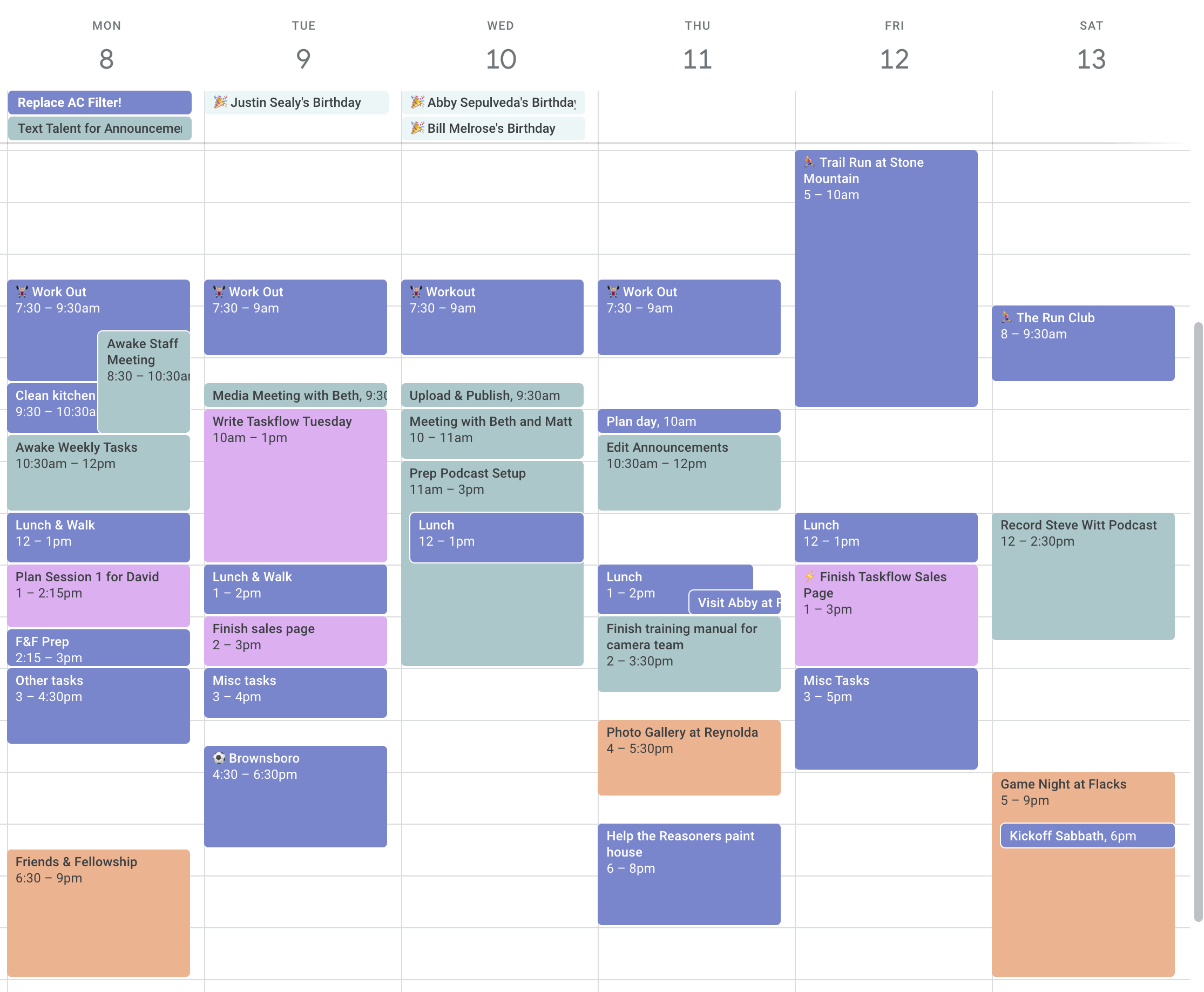
This simple setup is the number 1 thing that helps me stay on top of my responsibilities.
I've set up my Google Calendar with ten color-coded calendars, covering everything from work commitments to family plans. Each color represents a different category, helping me keep things organized.
But the real game-changer? The widget on my phone's home screen. It gives me a quick view of the upcoming week – it feels like having a personal assistant.
So, if you're struggling to manage your schedule, give this setup a try. A bit of color coding and a convenient widget can make all the difference.
✅ Here's how to set it up:
Open Google Calendar and create separate calendars for different areas of your life.
Assign a unique color to each calendar to distinguish them visually.
Add your events and appointments to each calendar.
Enable the Google Calendar, Minical, or Notion Calendar widget on your phone's home screen.
Customize the widget size and display preferences to suit your needs.
Stay organized and effortlessly manage your schedule with a glance.
👩💻 2. Overcome Procrastination
This article from Freedom, an excellent app blocker, talks about how procrastination can derail even the best-laid plans, but understanding its root causes and implementing the right strategies can help.
It highlights six approaches to overcome procrastination, including something it calls “chunking”, the “GTD System”, “Autofocus”, and leveraging digital tools like ToDoist, Freedom (I saw this one coming 😅), and TogglTrack.
Let me know if you have any tools or strategies that you find helpful in fighting procrastination!
🔗 3. Hyperlinking >
Please, I beg of you, stop sending ugly links and start hyperlinking.
Hyperlinking is when you insert a link inside of a piece of text.
It’s like creating a custom button that takes the reader wherever you want them to go. The best part of this is you control the name of the link. You can add helpful information to the title, it looks more professional, and it’s just cleaner.
💻 Create a hyperlink in 5 seconds:
Copy the website URL you want CMD+C.
Highlight the text you want to turn into a hyperlink.
Use the keyboard shortcut CMD+K.
Paste the copied link using CMD+V into the text field.
Hit enter to create the hyperlink.
👋 Want to work together?
My coaching program is aimed at helping people get digitally organized and setup with sustainable productivity systems.
🎯 Here's what my coaching covers:
Streamlining workflow and task management
Digital organization and minimalism
Time management strategies
Optimizing email and calendar systems
Team collaboration and communication
Click the button below if this sounds like something you'd be interested in!
That’s all for now! Have a great day. 👊🏼
David
😁 Enjoying the newsletter? Have a friend who would appreciate it as well? Click the button below and help me grow the Taskflow Tuesday community!
👇🏼 Thank you for your time and trust. If the newsletter no longer adds value, feel free to unsubscribe below. No worries, it's not for everyone.
💬 Is there a specific topic you want to see in future issues? Hit reply and let me know.