



👋 Hello!
This is issue #19 of Taskflow Tuesday, where I share 3 things that can help you to get digitally organized so that you can spend more time on what truly matters.
⌨️ 1. Send Screenshots Faster
Before I even begin this section I’m going to give you a pro tip right off the bat.
⚡ It usually pays off to go digging around your favorite apps settings.
There are often tons of hidden features you’ll find back there.
Okay,
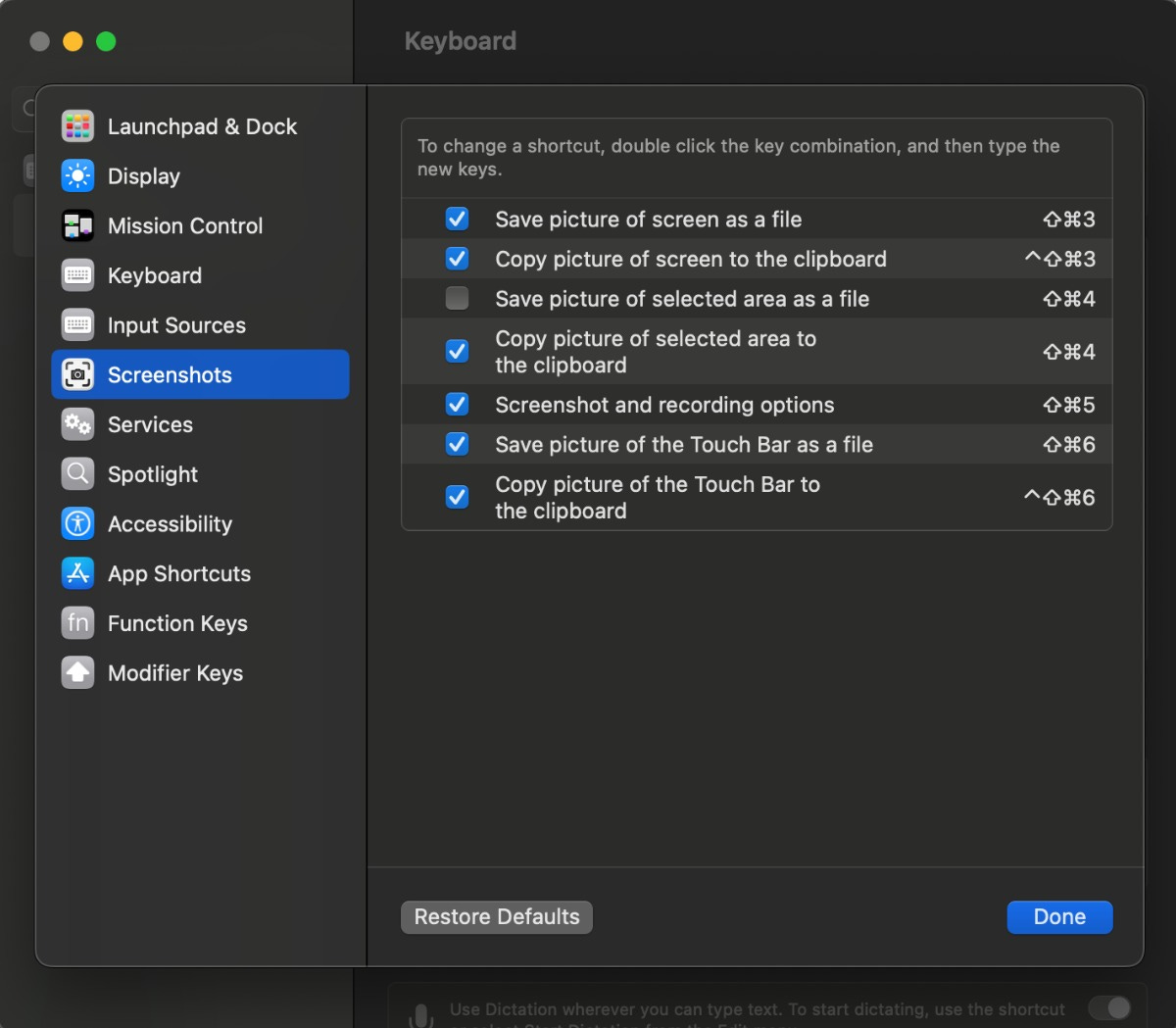
so for the longest time I would take a screenshot on my laptop, it would save to my desktop, then I would minimize everything, and attempt to drag and drop the photo to where it needs to go.
In the settings, you can choose where a screenshot goes when you take it. It can automatically save to your desktop or it can be copied onto your clipboard. The clipboard is what holds the files you are about to paste somewhere.
Now, I just take a screenshot (Shift+Command+4), and then paste it (Command+V) wherever it needs to go.
There are a bunch of other great options as well! Just go to your settings and search “Screenshots”.
⚡ Pro Tip: If you’re looking for something in your iOS settings, just search the keyword and it will pop up instantly.
🗓️ 2. Create Your Ideal Week
Productivity guru, Ali Abdaal, recently talked about this in a video.
Here’s the breakdown:
🕰️ There are 168 hours in a week. Subtract ~56 hours we spend sleeping and we’re left with 112 hours.
✍️ It’s up to you to define your “Ideal Week”: Your absolute ideal allocation of those 112 hours.
💻 It’s easy to setup.
Create a new Google Calendar on the sidebar under “My Calendars”
Name it “Ideal Week”
Decide how you would like to spend your time during an ideal and ordinary week
Most of you who work a 9-5 will just put a massive block for work every day. But even then, you can prioritize and plan your time. You might be able to schedule a quick walk in the afternoon or stretch breaks at certain times.
My Ideal Week includes:
☀️ Morning Routine
🚶♂️Walk breaks
🍽️ Lunch
🏋️ Gym
🤝 Weekly Meeting
🫡 Other Commitments
Each day looks a little bit different for me and I’ve planned my ideal week to work with my wife’s schedule as well.
⚡ Now that you have your Ideal Week, you can leave it turned off by default, and turn it on to see it underneath your actual schedule. This will help you see if your calendar reflects your values and goals.
I’ve only been using mine for a couple of weeks and I already see a difference in how more efficiently I’m using my time.
This is a simple hack that brings fast results.
📩 Email me if you have any more questions about this or if you feel like your schedule isn’t conducive to this practice. I bet I can prove you wrong and help you out in the process.
🧠 3. Time Management Isn’t The Issue
I read this caption on Instagram a while ago from Leila Hormozi on time management and I keep coming back to it.
“Why does your time seem to VANISH into thin air? Over the years, consistently I have had people come to me asking what techniques I use to manage my time. How this often shows up...
What's the best way to manage my time?
I have no time, and when I do, l'm exhausted
I don't have any time until the end of the day or early morning
Typically when you peel back the layers to this, the right question is really, "What technology can you suggest that will help me do the things I do not want to do, when I do not want to do them?"
Therefore, the question is not how does one manage 'time' but how does one manage procrastination. Which really means, "How do I manage my attention?" Because funnily enough, humans don't like to pay attention to things they do not like doing, or do not feel competent in doing.
What happens when you cannot focus on the task at hand and therefore cannot move a project or situation forward?
You feel forced to do things that you don't want to do, and you end up hating it, so you get frustrated and seek to do something more stimulating. But of course, then your anxiety builds because a deadline is near.
You get it done 'good enough' and that 'good enough' allows you to justify repeating this behavior over and over, and over again.
There Is No Tool To Solve This.
A majority of the time, 'Time Management' issues are actually just Anxiety, Boredom, and Rebelliousness Management. Which then becomes thinking management, and at the point you have managed your thinking, you can then take a look at managing your time.
Time Management is often seen as a practical problem, but it actually is just a mask for the thinking problem that lies beneath the surface. You are spending time trying to solve your problem's problem. Not your actual problem.”
That’s all for now! Have a great day. 👊🏼
David
😁 Enjoying the newsletter? Have a friend who would appreciate it as well? Share this page with them and help me grow the Taskflow Tuesday community!
👇🏼 Thank you for your time and trust. If the newsletter no longer adds value, feel free to unsubscribe below. No worries, it's not for everyone.
💬 Is there a specific topic you want to see in future issues? Hit reply and let me know.