



👋 Hello!
This is issue #55 of Taskflow Tuesday, where I share 3 things that can help you to get digitally organized so that you can spend more time on what truly matters.
⚙️ 1. You People Don’t Need More Tactics — You Need a System
You’ve probably done this before:
Download a new productivity app, set it up perfectly, then stopped using it after 3 days.
Same with time-blocking, or Notion templates, or the newest browser extension promising focus.
We collect tools, hacks, and templates — hoping the next one will finally “fix it.”
But none of them stick. Why?
It’s because most tactics solve surface-level problems. But what we actually need is a system.
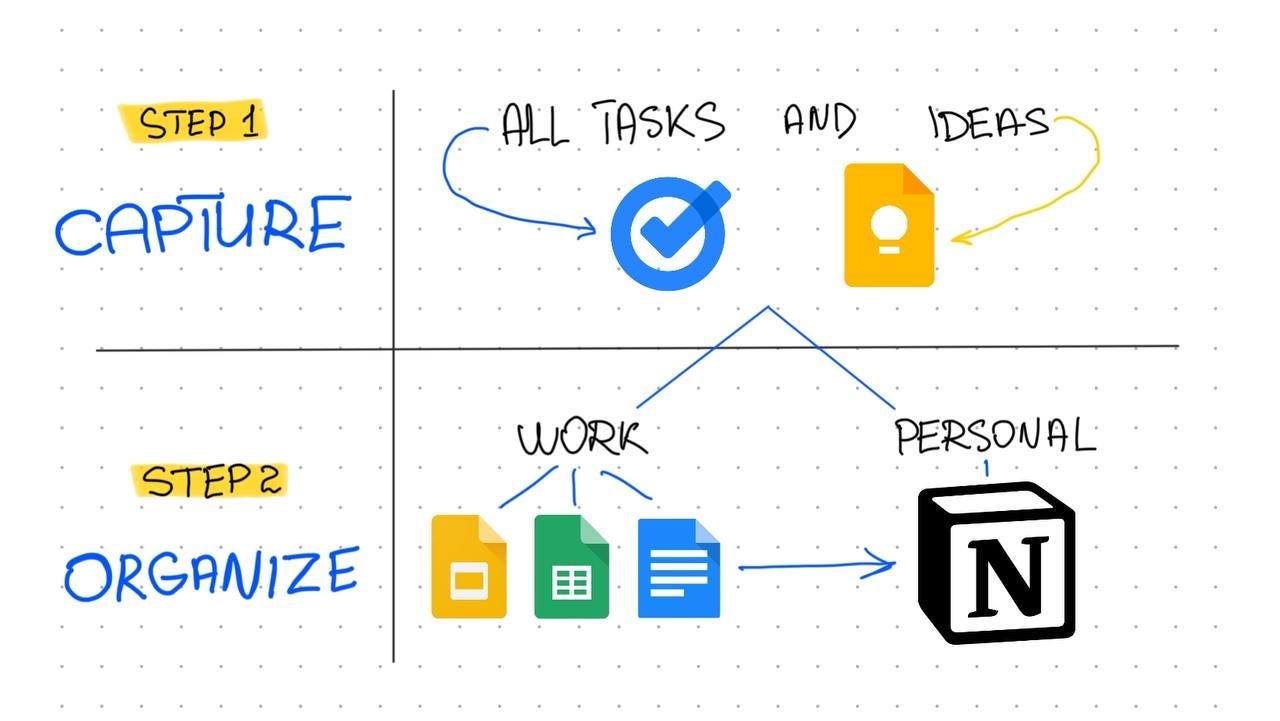
🏷️ Here’s a good example of a simple yet powerful productivity system.
🎛️ What actually is a system?
A system is a repeatable, realistic set of actions that solves a recurring problem.
It includes:
A trigger or routine (when and how it happens)
A checklist or structure (so you don’t have to rethink it each time)
A place it lives (calendar, task manager, Notion, etc.)
A reason it matters (so you’re motivated to keep doing it)
👨🏼🏫 Here’s the difference:
A tactic is: “plan your week on Sundays.”
A system is: “Every Sunday night, I sit down with a checklist that includes reviewing my calendar, checking my goals, cleaning up my task list, and blocking time for the big stuff. It’s on my calendar, takes 25 minutes, and I pair it with a good playlist and a cup of coffee”
Tactics are helpful. But they only work if they plug into something bigger.
They need a home-base and a rhythm.
So if you feel scattered or stuck, stop asking “what tactic am I missing?”
Start asking: “What problem do I keep running into, and what’s the repeatable process I could build to solve it?”
That’s how systems are born.
And once you have a few in place? That’s when your life stops feeling like it’s held together with duct tape.
🎧 2. The Focus Mode You’re Not Using (But Should)
Most people use Focus Modes on their phone just to silence notifications.
But here’s a trick: you can turn your entire phone into a distraction-free tool with one setting.
Set up a custom Focus Mode that only allows 2–3 apps, and hide everything else.
How?
Go to Settings → Focus → + → Custom
Name it something like “Deep Work” or “Present Mode”
Under Home Screen, create a custom page with only the apps you want (like Calendar, Notes, Camera)
Under Allowed Apps, block everything else
Add it to Control Center so it’s easy to toggle on/off
🪄 When you turn this on, your phone literally transforms into a different tool: no notifications, no feeds, no chaos. It feels like a different device.
🎁 Bonus use case: create one called “Evening Wind-Down” and hide work tools after 8pm.
You don’t need to delete your apps, just hide them when you want to think clearly again.
🚫 3. The Lie of Multitasking
Multitasking feels productive, but it’s almost always a trap.
You’re not doing two things at once. You’re rapidly switching between them, and every switch comes with a hidden cost: lost momentum, dropped context, increased mental fatigue.
And here’s the kicker: it trains your brain to never be fully present.
Instead of doing one thing well, you half-do five things and feel scattered the whole time.
🔧 What’s the fix?
Batch your work. Group similar tasks together and give them their own time blocks.
Use single-tasking language. Instead of asking “What else can I do right now?” try “What deserves my full attention right now?”
Use full-screen mode. Hide everything else: browser tabs, apps, notes - and just do the thing.
Keep a scratchpad nearby. Every time your brain throws up a random task, write it down and return to the main thing.
Multitasking isn’t a skill. It’s a habit of distraction. And the best systems protect you from it.
Want to work together?
👋 When you’re ready, here are 2 ways I can help you:
⚡️ Join The Taskflow Blueprint
A 4-week reset to help you build better habits, plan your ideal week, and create a system that works for your life.
If you book a discovery call, we’ll chat for 15 minutes, identify where you’re stuck, and I’ll give you 1–2 actionable takeaways you can implement right away.
That’s all for now! Have a great day. 👊🏼
David
😁 Enjoying the newsletter? Have a friend who would appreciate it as well? Click the button below and help me grow the Taskflow Tuesday community!
👇🏼 Thank you for your time and trust. If the newsletter no longer adds value, feel free to unsubscribe below. No worries, it's not for everyone.
💬 Is there a specific topic you want to see in future issues? Hit reply and let me know.